While I have many posts about SDXL, I do not use Stable Diffusion 3 at all - license concerns aside, it is simply not good, and may never get better. But just a few days ago, a new, freely available, offline model that is better than SDXL was released by the team that presented Latent Diffusion and created Stable Diffusion, Flux.1 by Black Forrest Labs!
Installing
I have a low(-ish) end Ryzen PC with an NVidia RTX 2060 with 12GB VRAM and 16GB RAM. I needed a lot of Virtual Memory (paging file). When I initially tried the workflow below, ComfyUI would immediately exit after logging got prompt. The reason was insufficient page file, and while the setting was large enough, I simply did not have enough free disk space to allocate file!
If that happens to you too, then from the Start Menu > search for advanced system settings then uner Performance Options applet Advanced tab, click the Settings... button in the Performance settings section. In the Advanced tab, click the Change... in the Virtual Memory settings section. Make sure the Maximum size (MB) of the paging file size some where around 30GB - 48 GB, which seems to be my peak.
First off, I followed this guide on Reddit, You can run Flux.1 on 12gb vram, to download the models. Where available I used FP8:
- Download either the Flux.1-Dev or Flux.1-Schnell model and save it to
comfyui\models\unet- each mode is 23.8 GB:- Get flux1-dev.sft) which is releaseed under their non-commercial license, or
- Get the distilled, apache-2.0 licensed flux1-schnell.sft model (1-4 steps) at potential expense of image quality (Schnell is the German word for fast, quick or swift)
- From the same download location, also, download the VAE
ae.sftwhich is 335 MB, tocomfyui\models\vae. - Next, download the flux text encoders and save them in
comfyui\models\clip:- Get
clip_l.safetensors(246 MB) - Either
t5xxl_fp16.safetensors(9.79 GB) ort5xxl_fp8_e4m3fn.safetensors(4.89 GB)
- Get
Then:
- Update ComfyUI, e.g.
comfyui_update.baton the Windows Portable version - And, you may wish to consider editing the startup batch file
run_nvidia_gpu.batto add the--lowvramargument
Workflow
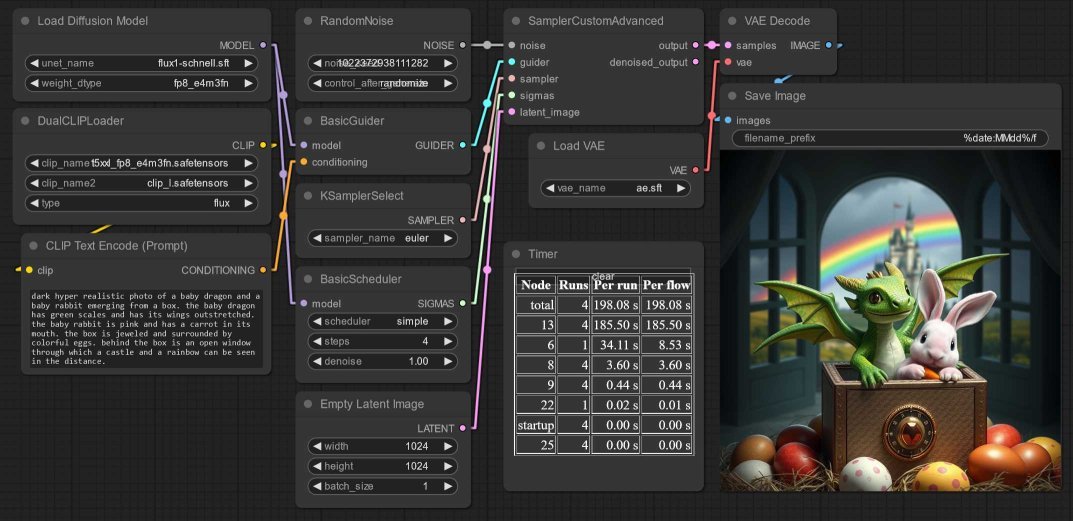
Based on the standard ComfyUI Flux Workflow Exmaple:
- Add the DualCLIPLoader node - I load the
t5xxl_fp8_e4m3fn.safetensorsmodel as clip_name1 andclip_l.safetensorsas clip_name2. - Wire this up to a CLIPTextEncodenode.
- Add the Load Diffusion Model UNETLoader node - I set the weight to
fp8_e4m3fnbut maybe this is slower than the other option. - And wire these nodes to a BasicGuider node and
- Next, a BasicScheduler
simplenode with 4 steps - though this Reddit post by u/BoostPixels suggests thebetascheduler too - Along with RandomNoise, KSamplerSelect
eulerand EmptyLatentImage. - All these node outputs become input to a SamplerCustomAdvanced node.
- VAELoader loads
ae.sft, and passes it to the VAEDecode node.
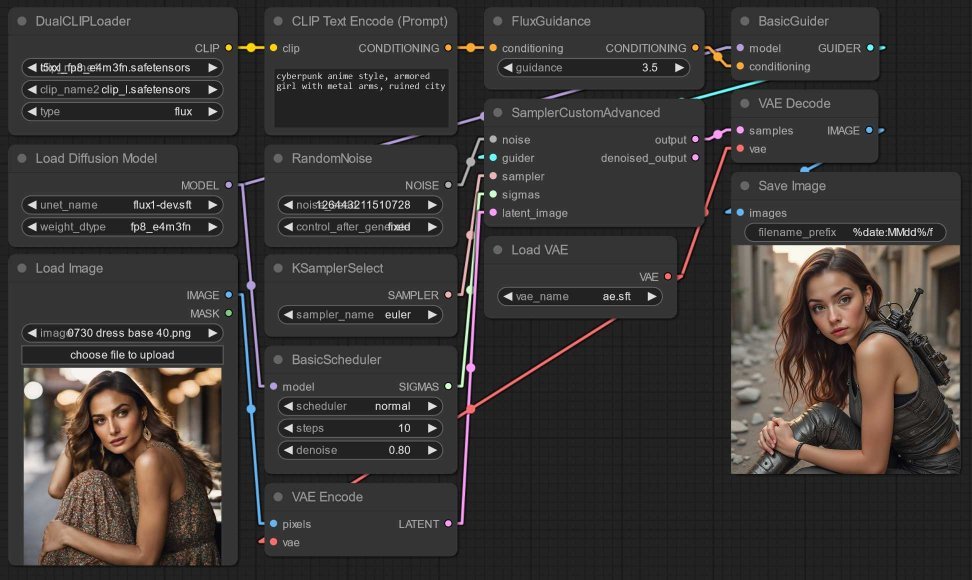
Things keep improving so fast. Before I even managed to post this, a new version of ComfyUI was released with a new node FluxGuidance! As this Reddit post by u/JBulworth explains, setting “FluxGuidance between 1.2 and 2” outputs sketchy painting styles.
Image-to-image also works to transfer a style to an image:
Conclusion
The Schnell model with 3-4 steps takes 3-4 minutes!
- but output tends towards incorrect text and freaky anatomy,
- and outputs are often a bit cartoon-y or even comic style, no idea why.
On my potato, the Dev model with 20 steps takes about 10 minutes!
- but generates text better, like Stable Cascade.
- and has great anatomy and fingers e.g.
woman lying on grass!
Flux has great prompt adherence and image composition. It handles relative positions well, and is flexible with image sizes and aspect ratios (see this Reddit post by u/BoostPixels that suggests targeting 1920x1080).
Alas Flux does not have artist styles or stylization encoded, copyright, no doubt. That’s where SDXL can be added as a kind of refiner stage, as SDXL has many many fine tunes, Control Nets, LoRAs...
Have fun!