My Time Machine backups have started to take longer and longer to process and complete. I realized that excluding folders containing temporary, frequently changing and large files would quite dramatically speed it up.
Here’s what I excluded from System Preferences > Time Machine > Options…:
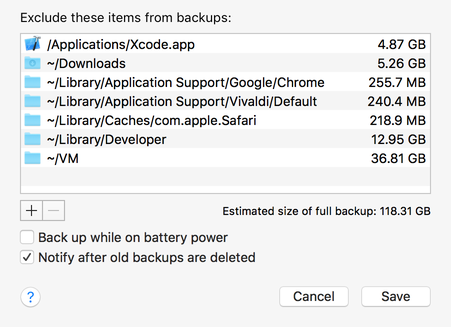
- Safari, Vivaldi and Chrome browser caches:
~/Library/Caches/com.apple.Safari
~/Library/Application Support/Vivaldi/Default
~/Library/Application Support/Google Chrome
- Xcode and developer libraries:
/Applications/Xcode.app
~/Library/Developer
- And any other folders you don’t mind losing. In my case, I added my Downloads and VM folders too.
💡 Tip
The Vivaldi and Google folders above may also contain bookmarks and other files, so it’s best to be a bit more fine grained than I am, but this is good enough for me since I think they are stored in the Cloud in any case.
One could go all the way and exclude all /Applications and ~/Library/Caches on the assumption that these could be re-downloaded or re-generated as needed anyway. And even exclude the ~/.Trash…
If you have trouble finding these folders, either:
- Press Command + Shift + G and type them in e.g.
~/Library, - Or, search and press the + button to add System files are included to the search filter.